
 Contact Us
TOMODEV
Posted on 19th November 2025[Sharing] Risk-Based Testing + Exploratory Testing in Agile
Author: Anh NguyenIntroduction
In Agile, testing time is usually short and requirements change frequently. To survive in this "harsh" environment, we testers always need to optimize our testing methods and strategies.
Risk-Based Testing helps us clearly see where the risks are hiding, while Exploratory Testing opens the door to creativity and discovery.
Here, I would like to share how to combine these two mindsets, so we can not only test better but also help shape a stronger, more sustainable, and reliable product.
1. Overview & Concepts
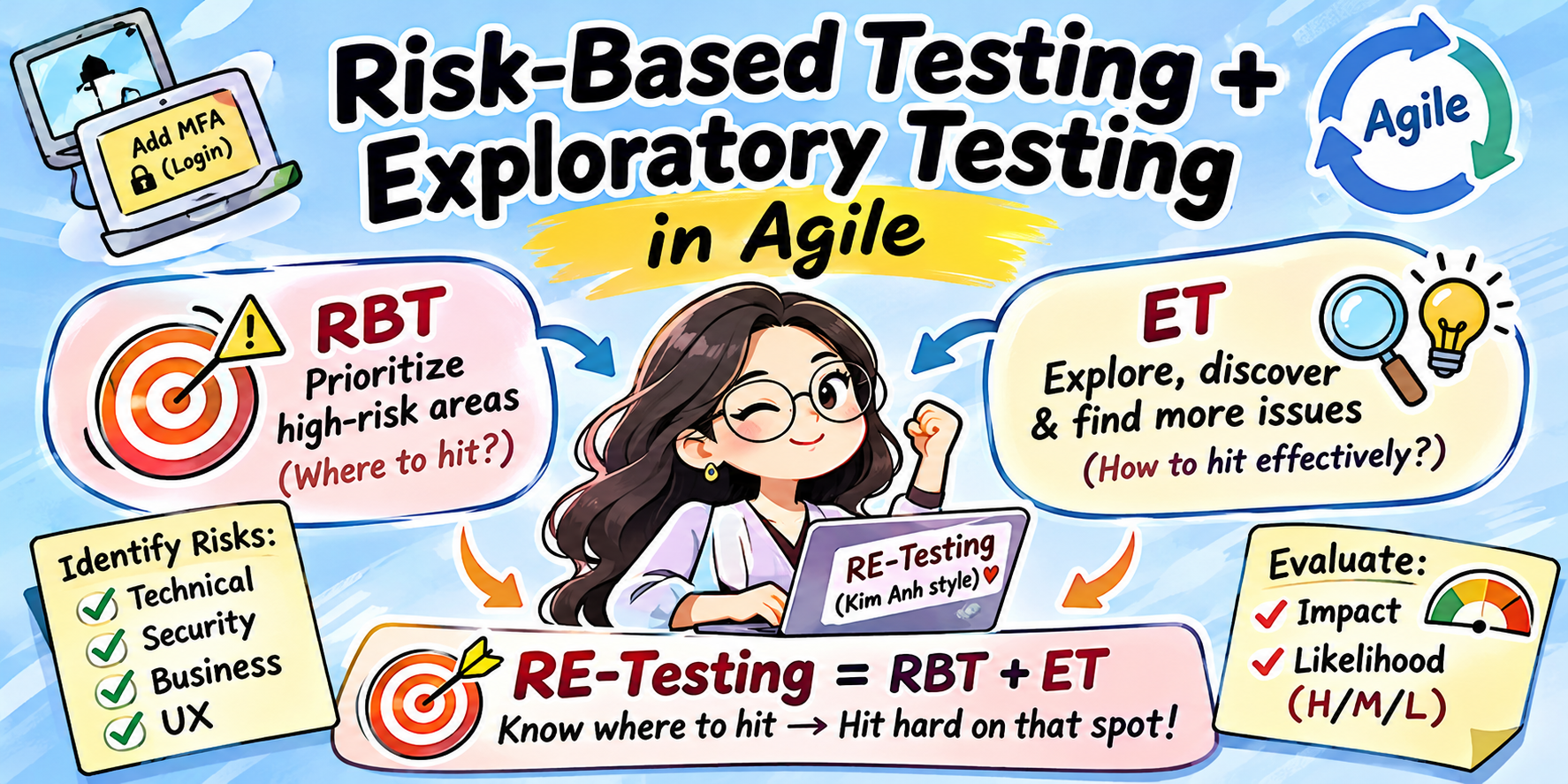
Risk-based Testing + Exploratory Testing(let's call it RE-Testing, in "Kim Anh style" :D)
- Risk-based Testing (RBT):
"You can't test everything, only test what would be most disastrous if it fails."
→ Answers the question: "Which parts should I prioritize to test in this sprint?" - Exploratory Testing (ET):
"No writing test cases in advance. Think while you test, test while you think."
→ Answers the question: "How can I attack those parts most effectively in the shortest time?"
Combine both = RE-Testing:
Use Risk-Based Testing to know where to hit → Use Exploratory Testing to hit hard on that spot.
2. Practical Process for Testers
Real-world Example: Task Requirement — Add MFA (Multi-factor Authentication) feature to Login
Step 1 — Risk Identification
Start this from the beginning of the sprint — it helps save time and focus testing on the right priorities. There are four main groups of risk:
- Technical Risks: Does the new requirement affect "sensitive" areas or other dependent features? (e.g., Reset password, SSO…)
- Security Risks: Are there areas where data leakage or unauthorized access can happen? (e.g., session bugs, incorrect validation…)
- Business Risks: Risks directly related to product value (e.g., misunderstanding specs or wrong requirement implementation…)
- User Experience Risks: User flow, is the real-life experience smooth or are there blockers? (e.g., stuck navigation…)
After identifying risks, evaluate two main factors: Impact and Likelihood, each as High – Medium – Low.
Risk Matrix for MFA feature example:
High Risk: Test with top priority, deep and thoroughly, dedicate more exploratory time
| Example | Impact | Likelihood | Remarks |
|---|---|---|---|
| MFA code not sent/received, or correct code but can't login | High | High | Directly affects login |
| Wrong MFA logic (expiry time, max attempts, account lock after failed attempts) | High | Medium | Can cause security holes |
| Bypass MFA | High | Low | Critical security risk |
| API performance when sending MFA code | High | Medium | Possible overload |
Medium Risk: Focused testing on main flows
| Example | Impact | Likelihood |
|---|---|---|
| UI error when entering many characters | Medium | Medium |
| Browser compatibility | Medium | Low |
Low Risk: Do after finishing High and Medium
| Example | Impact | Likelihood |
|---|---|---|
| Test UI/UX | Low | Low |
Step 2 — Prioritize Testing by Risk
- Items with High–High: Prioritize to test early, deeply, with both test cases and exploratory approaches.
- Medium/Low items: Test later or focus on "happy path" main flows.
Example (MFA Task):
High Risk → Detailed test cases & earliest testing
- User logs in correctly, MFA code sent successfully
- Resend MFA code & login successfully
- MFA code expires after X seconds
- MFA code retry limit exceeded → temporary lock
- MFA code cannot be reused
- Cannot bypass MFA by editing URL/calling API directly
- API sending MFA code must not expose sensitive information
Medium Risk → Main test cases
- UI displays correct error messages as per specs
- Compatibility with browsers (Chrome/Firefox/Edge)
- User login with correct Role (permissions)
- Priority checks on Login (MFA first, account lock, IP limits, etc.)
Low Risk → Smoke test
- Text and spacing checks
Step 3 — Design Test Charters for Exploratory Testing Based on Risk
Test Charter is a short test mission that describes what you will test, why you test, and which areas to explore. It helps testers stay focused during each exploratory session, yet remains flexible to discover unexpected issues.
In short:
Test Charter = test objective + scope + timebox
Example (MFA Task):
- Charter 1 — Bypass MFA
- Objective: Try ways to access the system without an MFA code.
- Scope:
- Use URL to directly access TOP page after login
- After logging in and verifying MFA, reuse old session/cookie to bypass
- Try API login → possible to skip MFA?
- Timebox: 60 minutes
- Charter 2 — Error Handling + Network Condition
- Objective: Check results when the MFA code is delayed or there is network instability.
- Scope:
- Simulate slow network → does MFA timeout?
- Refresh MFA screen → how does the system handle?
- Timebox: 45 minutes
- Charter 3 — Security-focused Exploratory
- Objective: Find potential vulnerabilities.
- Scope:
- Check if user data is leaked in logs while sending MFA
- Input script in MFA field for basic injection test
- Timebox: 30 minutes
- Charter 4 — UX Exploratory
- Objective: Assess real-world experience with MFA
- Scope:
- User continuously inputs wrong OTP — is the UI/UX clear?
- Enter MFA code exceeding allowed length
- Copy/paste MFA code from email
- Timebox: 20 minutes
Step 4 — Execute Both Test Cases (RBT) and Exploratory Sessions (ET)
- Test cases: Check main/critical cases (both positive & negative)
- Exploratory sessions: Hunt hidden bugs, try unexpected scenarios, basic security checks
Example: MFA Task Execution Priority
| Priority Order | Action | Reason |
|---|---|---|
| 1 | Test High-risk cases (MFA sent/verified, login success) | Ensure critical functions |
| 2 | Exploratory Session Charter 1 (Bypass) | Find hidden bugs |
| 3 | Test Medium/Low risk cases | Scope stability |
| 4 | Exploratory Session Charter 2, 3, 4 | Find edge cases |
| 5 | Re-test & bug-fix verification + Regression Risk-based Testing | Focus on high-risk areas |
| 6 | Smoke-check full Login flow + related functions (e.g., Reset password, SSO, Holding…) | Cover unexpected affected areas |
Step 5 — Record, Report and Update Risks for the Next Sprint
If you find a major bug → update the risk level and adjust/add appropriate test cases for related functions next sprint.
By applying the above steps, in practice I found 3 consecutive high-risk issues—Dev team quickly fixed them so testing could progress smoothly:
- Resend MFA code: success, but login failed with new code
- Still able to login to TOP page after MFA verify, even though user had been locked
- 500 error on reloading direct link
3. Benefits of ET-Testing in Agile
- Highest risk areas are covered first — reduces chance of bugs leaking to production
- ET helps uncover unexpected issues (UI, logic, security, usability, etc.)
- Great adaptability to changes in requirements or scope
- Optimizes test time, especially under time pressure
4. Conclusion
With ET-Testing, you can Identify risks → Prioritize testing → Create exploratory charters → Execute in parallel.
All you need:
- Find where the dangers are (Risk-based)
- Attack those points, intensely and quickly (Exploratory)
Hope this combination of concept & real-world MFA feature example helps you understand how we can be both strict and flexible in testing — ensuring safety, usability, and discovering those hard-to-find bugs.